> For the complete documentation index, see [llms.txt](https://docs.amesa.com/llms.txt). Markdown versions of documentation pages are available by appending `.md` to page URLs; this page is available as [Markdown](https://docs.amesa.com/tutorials/industrial-mixer/strategy-pattern.md).
# Strategy Pattern
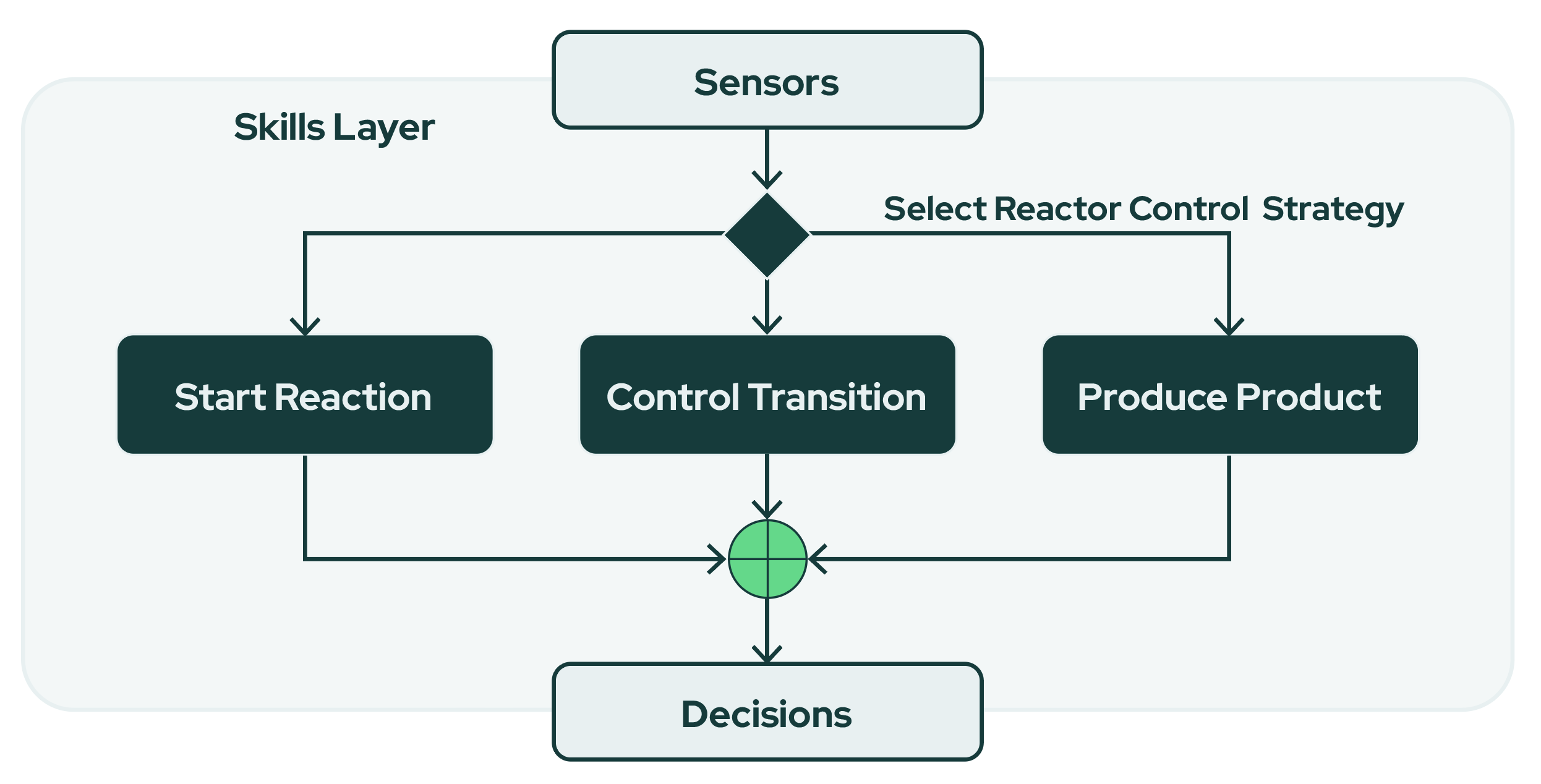
The strategy pattern is one of the key design patterns of machine teaching. When you use the strategy pattern, you break down the task into specific skill agents that each handle one aspect of the process to be controlled. This allows you to "teach" the agent system using subject matter expertise.
In the strategy pattern, each skill agent is either trained using deep reinforcement learning or controlled with a programmed algorithm. Then, a special skill agent called an orchestrator decides which skill agent should make the decision based on the current conditions.
In the industrial mixer problem, the process is divided into three skill agents based on the phase of the process. All three action skill agents and the orchestrator are trained with DRL: each skill agent practices in the conditions it will face and learns to control its part of the process by experimenting over time.
> *Think of the strategy pattern as like a math class with three students. Student A loves fractions, Student B is great at decimal problems, and Student C thinks in percentages. The* orchestrator *is their teacher. She reads each question, sees what kind of problem it is, and then assigns it to the student who can solve it best, because of their own special math talent.*
Let's get started configuring this agent system!
## 1. Create your skill agents
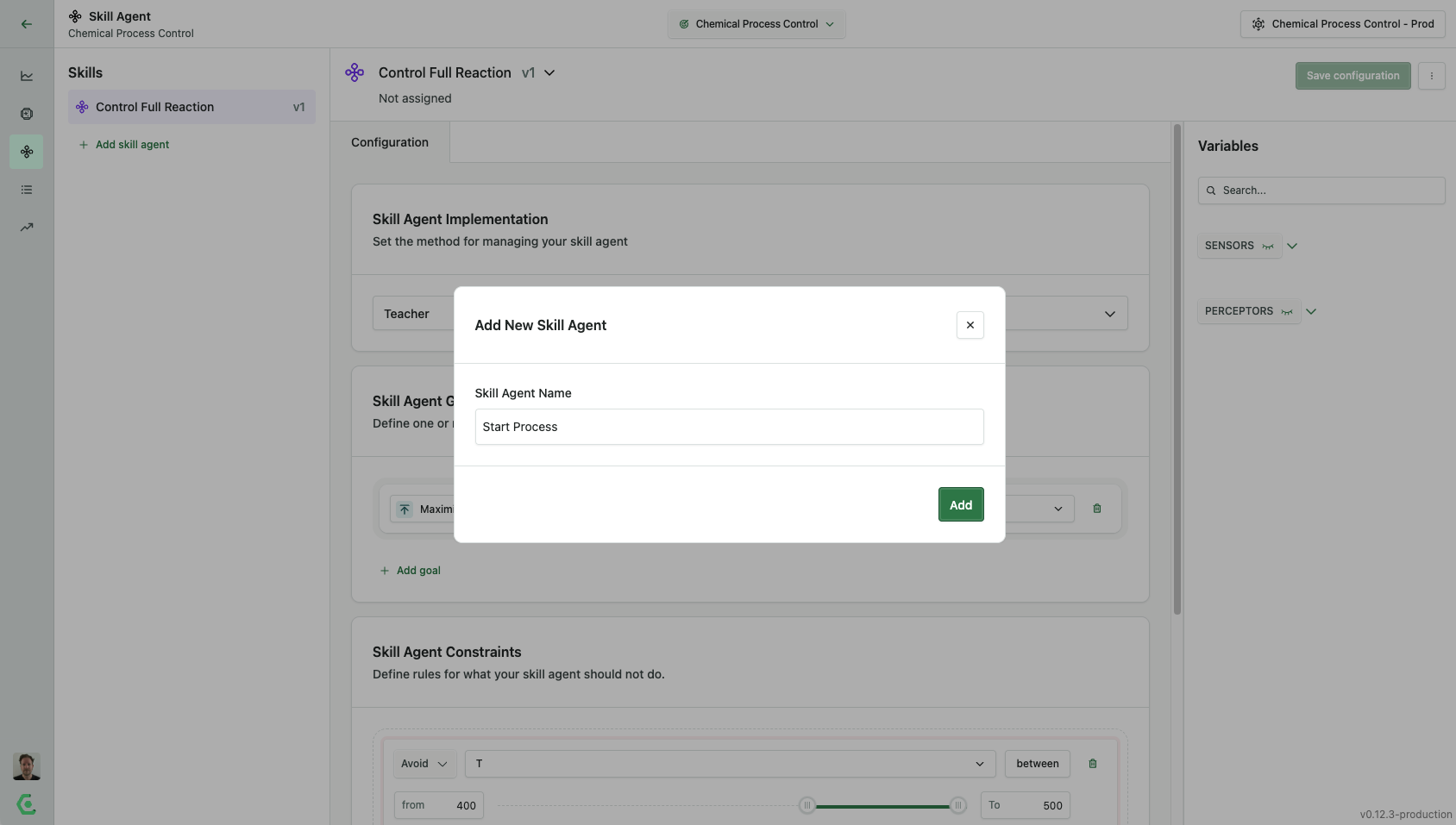
This agent system has three skill agents called `Start Process` ,`Control Transition` , and `Produce Product` . To create these skill agents in the UI, go to the skill agent page and click `Add skill agent` . Create all three skill agents and then set the goals and constraints.
## 2. Set Skill Agent Goals and Constraints
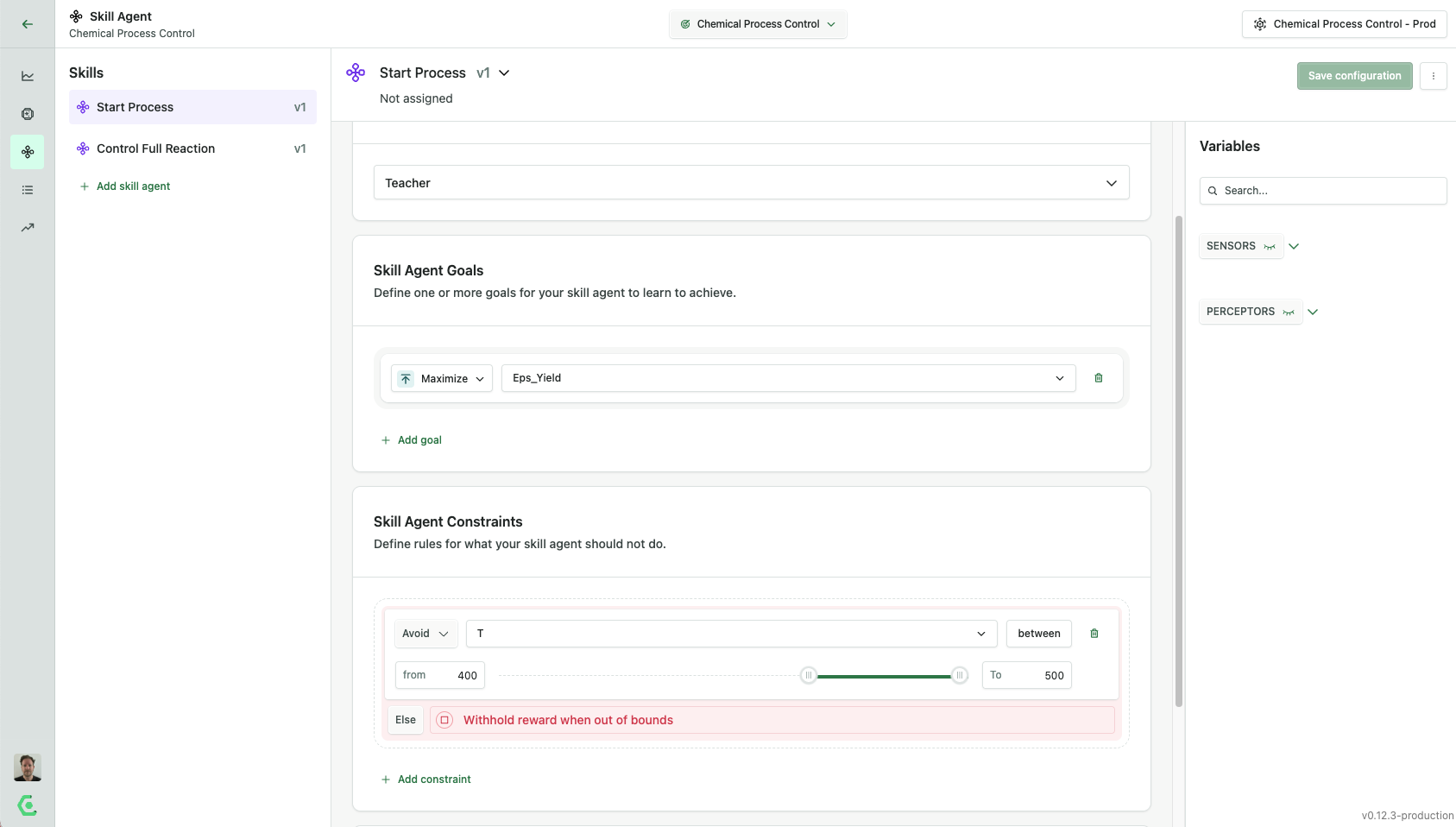
The goal for these skill agents is to maximize yield, and the constraint is to keep the temperature from going above 400 degrees Kelvin.
The goals and constraints are exactly the same in all three skill agents. The agents become specialized during training, as each skill agent trains in a different scenario, corresponding with the three phases of the process. We will create these scenarios later in the tutorial.
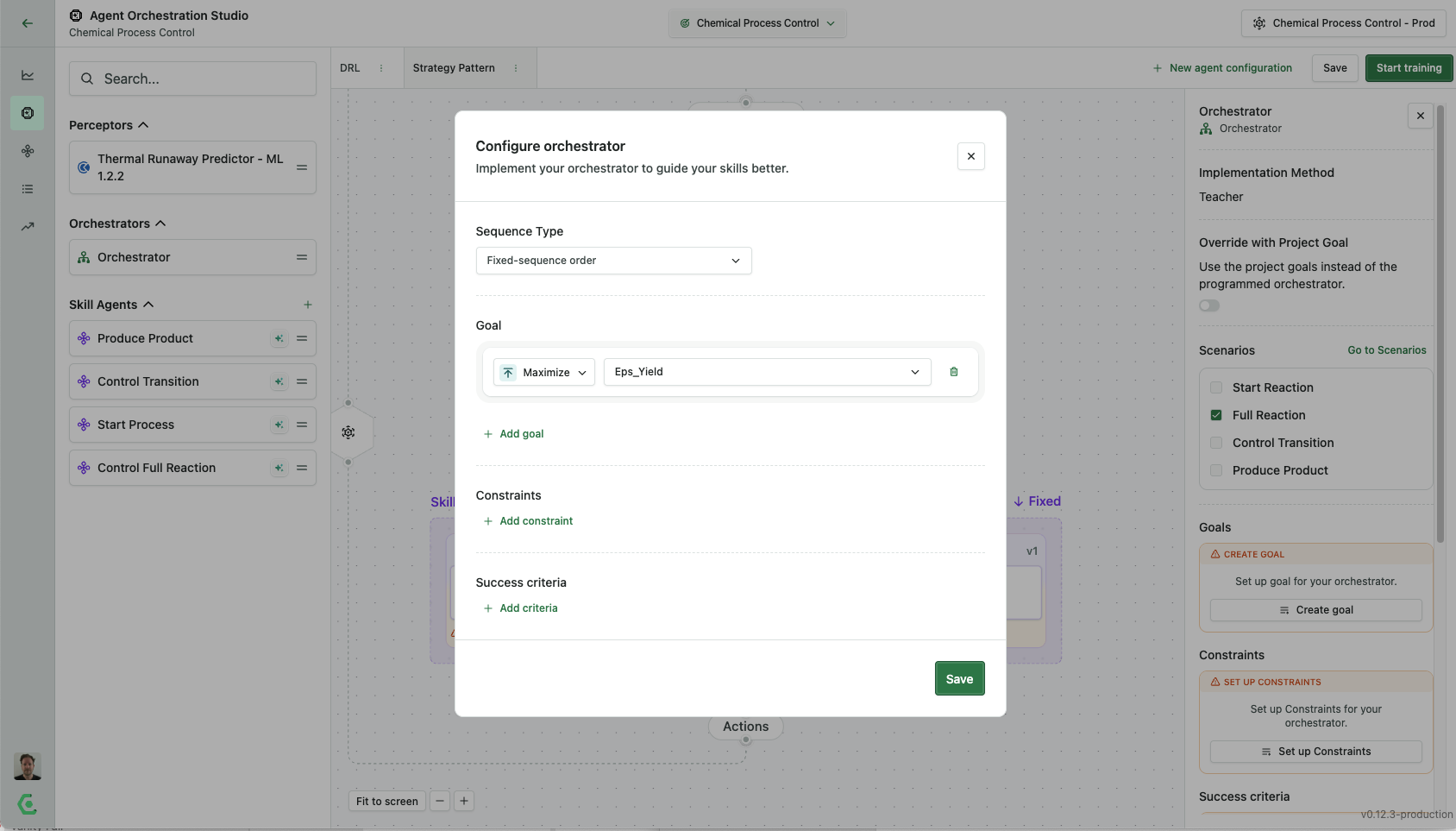
1. Click `Add goal` In the left drop-down menu, select Maximize, and in the right one, select `Eps_Yield` .
2. Click `Add constraint`. In the left drop-down menu, select `Avoid` , and in the right one, select `T` . After you select `T` you're going to see a slider appear for you to set boundaries you want to train the system to avoid. In this case, we want to set the boundaries from 400 to 500.
3. Save your skill agent and return to the Agent Orchestration Studio.
## 3. Add the Skill Agents to Your Strategy Pattern Agent System
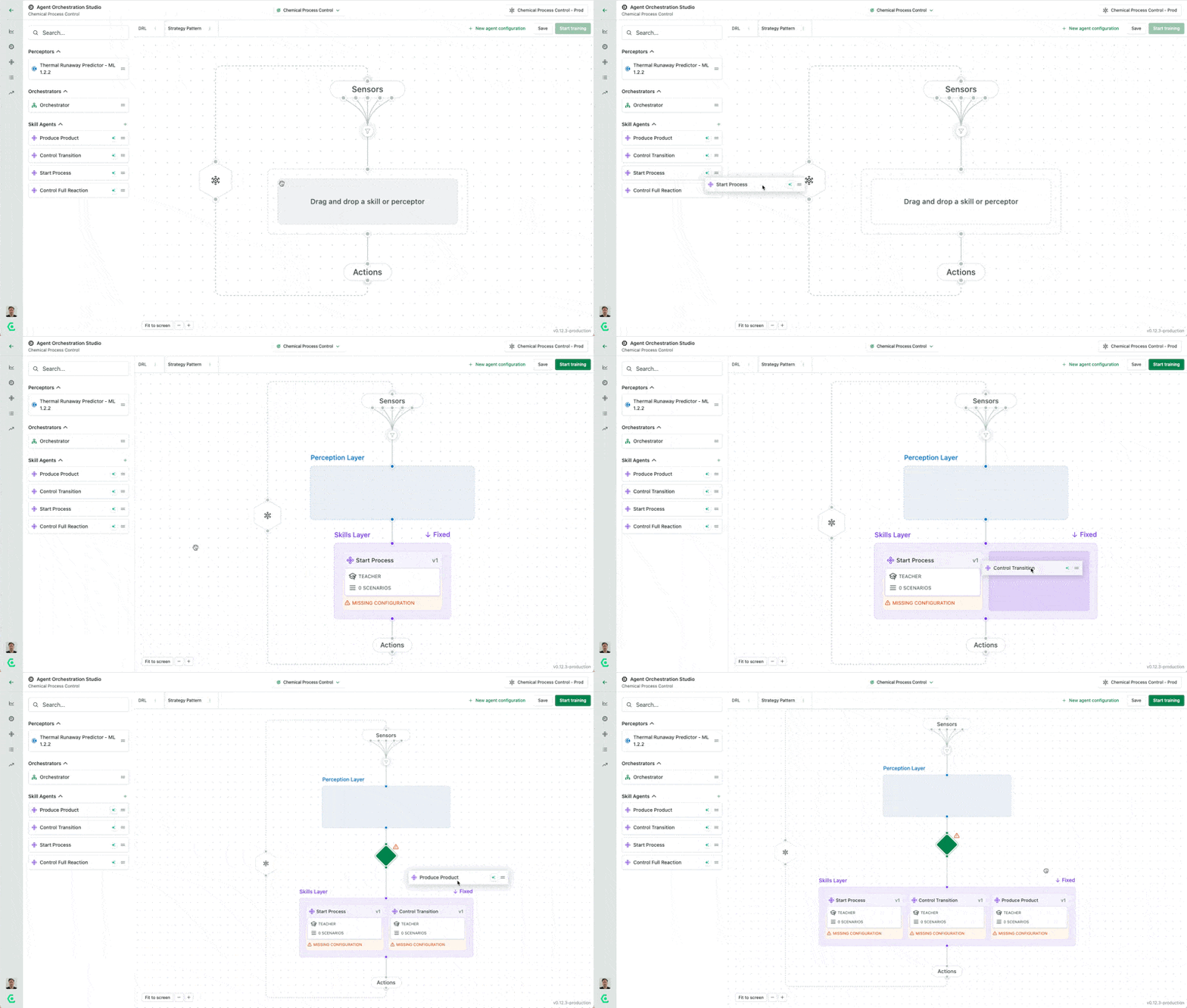
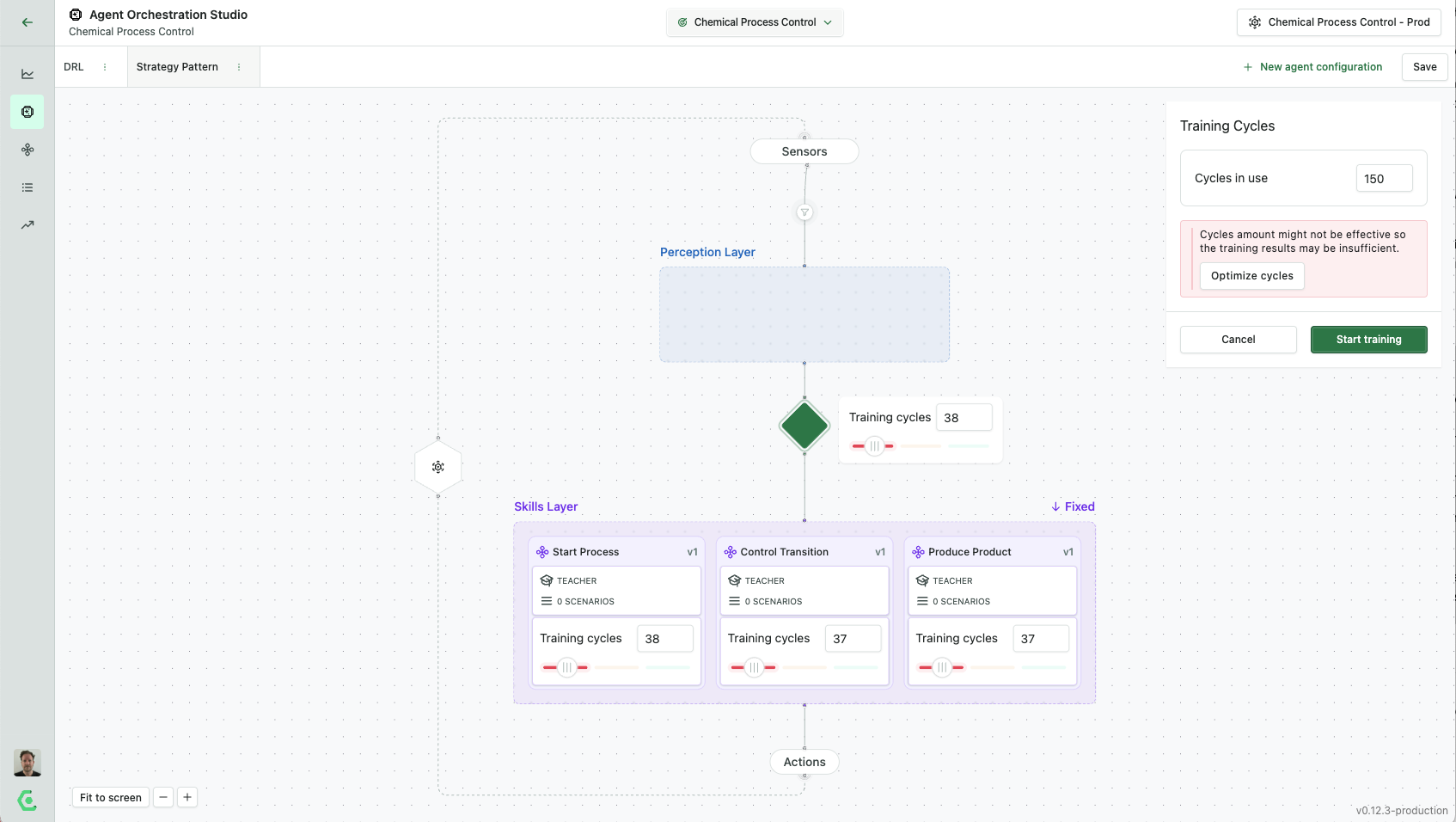
Drag the skill agents `Start Process`, `Control Transition`, and `Produce Product` that you can now see on the left-hand side of your use case onto the skills layer. Drag the skill agents from the side in the order you want them to be used.
## 3. Configure the Orchestrator
The green diamond that appears when you place multiple skill agents alongside each other is the orchestrator. This is the "math teacher" agent that decides which specialized skill agent should be chosen to make each decision.
The goals of the top-level orchestrator in an agent will typically be the same as the goals of the agent system as a whole. So, we can set it to `Maximize` `Eps_Yield`.
A fixed-order sequence is appropriate for a phased process like the industrial mixer reaction. That means the orchestrator has the skill agent apply the skill agents one at a time, rather than switching back and forth between skill agents.
## 4. Configure Scenarios
[Scenarios](/build-multi-agent-systems/configure-scenarios.md) are key to successfully training an agent with the strategy pattern. Scenarios are different possible conditions represented within the simulation. Skill agents are trained to specialize in different scenarios - for example, the `Start Reaction` skill agent specializes in controlling the reaction when the temperature and concentration levels are those found at the beginning of the reaction.
This is what allows the skill agents to differentiate from each other. The three specialized skill agents practice only in their designated phase of the process and learn to succeed in their own specific conditions. The orchestrator practices with the whole process so that it knows which skill agent to choose at any point.
### 4.1 Add Scenarios
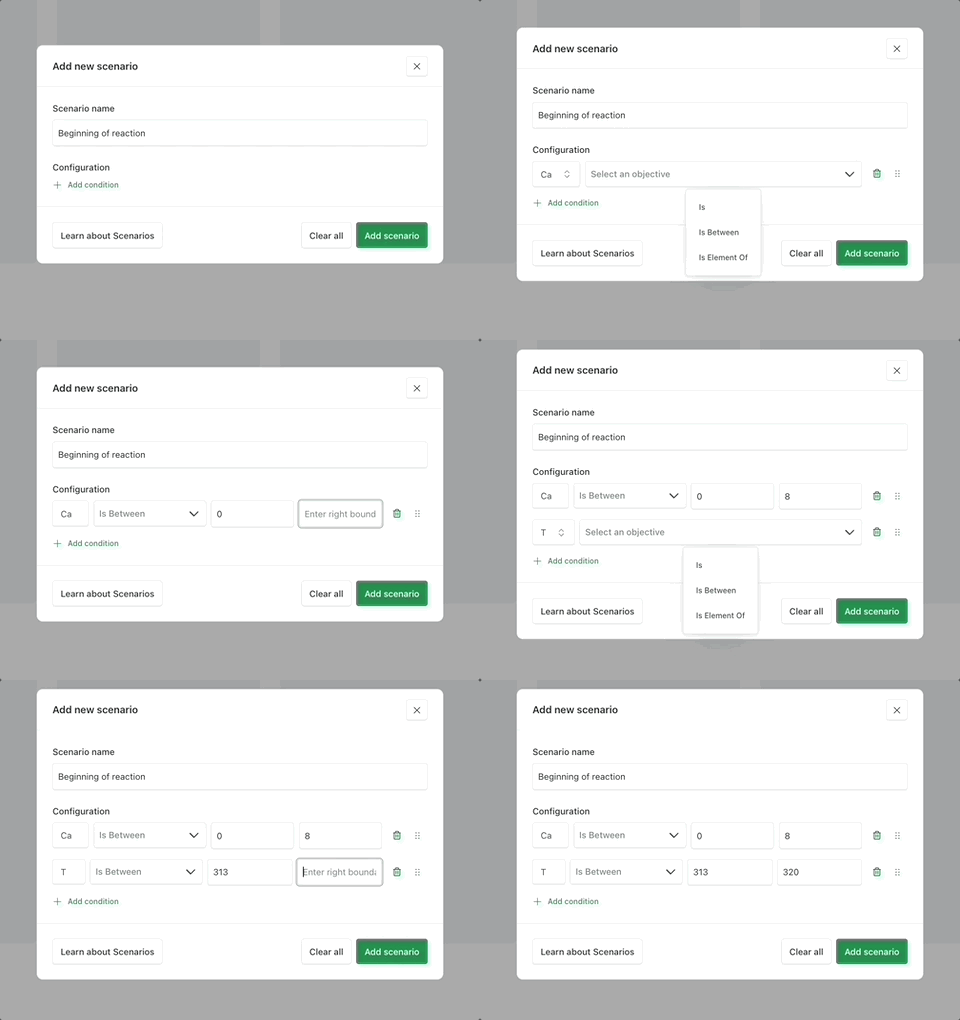
Go to the Scenarios page using the left-hand navigation menu. Click `Add Scenario` to create a new scenario for your agent to use in training.
When building an agent system for your use case, you will define the scenarios based on your knowledge of the task and process. In this case, we provide the values that define the phases of the chemical manufacturing process. Create these scenarios for your agent:
* Full reaction: Cref Is 8.57, Tref Is 311 | [Why these numbers?](#user-content-fn-1)[^1]
* Startup: Cref Is 8.5698, Tref Is 311.2612 | [Why these numbers?](#user-content-fn-2)[^2]
* Transition: Cref Is 8.56, Tref Is 311, count[^3] Is 22 | [Why these numbers?](#user-content-fn-4)[^4]
* Production: Cref Is 2, Tref Is 373.1311 | [Why these numbers?](#user-content-fn-5)[^5]
### 4.2 Create Scenario Flows
Scenario flows allow you to connect scenarios that have a sequential relationship to ensure that your agent gets practice in navigating the different conditions in the order in which they will occur.
For this problem, you do not need to create sequential connections between the scenarios. Drag all the scenarios to the first column to make them available to your skill agents and orchestrators.
### 4.3 Add Scenarios to Skill Agents and Orchestrators
Once you have your scenarios set up and connected with scenario flows, you can add them to skill agents and orchestrators to tell the skill agents and orchestrators what conditions they need to practice in. This helps them to develop their specialized expertise.
In the Agent Builder Studio, click on each skill agent and the orchestrator in turn. Check the box for each scenario to apply to the skill agent.
* Start process: Startup
* Control Transition: Transition
* Produce product: Production
* Orchestrator: Full reaction
## 5. Run Your Training Session
We are ready to train your agent system and see the results. Select the cluster you want to use and the number of training cycles. We suggest you run 150 training cycles.
You will see the skill agents training one at a time, and you assign the number of cycles you want each skill agent to use. It will automatically assign an equal number of training sessions for each skill agent, but in some agent system designs, some skill agents might require more training than others. For example, in this use case, the transition phase is more difficult to control than the two steady states, so the `Control Transition` skill agent may need more training time than the others to become effective.
## 6. View Results
When the training has been completed, you can view your results in the training sessions tab in the UI. This will show you information on how well the agent is learning.
You will likely see a steep learning curve as the agent experiments with different control strategies and learns from the results. When the learning curve plateaus, that usually means that the skill agent is trained.
### Analyzing the Strategy Pattern Agent's Performance
**Conversion rate**: 92% **Thermal runaway risk**: Low
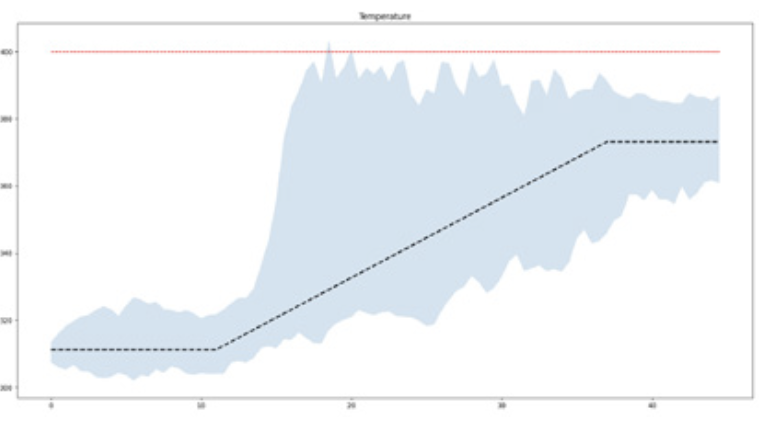
We tested this fully trained agent and plotted the results.
This agent system performance is not perfect, but it stays closer to the benchmark line than either of the two single-skill agent systems. It just needs some help avoiding thermal runaway. We can provide that by [adding a perception layer.](/tutorials/industrial-mixer/strategy-pattern-with-a-perception-layer.md)
[^1]: These numbers represent the conditions at the start of the reaction. Full reaction is the default scenario for this simulator.
[^2]: The numbers for startup are very similar to full reaction, because both scenarios represent approximately the same starting point. Startup is slightly different to make the two scenarios distinct from each other in the simulator.
[^3]: Count is a key that keeps count of decisions. Set this scenario parameter by
[^4]: The start of the transition phase is determined by the count key, which is a time counter. After 22 time periods (30 seconds in this case), the transition phase begins.
[^5]: In the production steady state phase of the process, the concentration of raw materials, measured by Cref, has dropped significantly, from 8.57 to 2. That means that a significant amount of product has been created.
---
# Agent Instructions
This documentation is published with GitBook. GitBook is the documentation platform designed so that both humans and AI agents can read, navigate, and reason over technical content effectively. Learn more at gitbook.com.
## Querying This Documentation
If you need additional information that is not directly available in this page, you can query the documentation dynamically by asking a question.
Perform an HTTP GET request on the current page URL with the `ask` query parameter, and the optional `goal` query parameter:
```
GET https://docs.amesa.com/tutorials/industrial-mixer/strategy-pattern.md?ask=&goal=
```
`ask` is the immediate question: it should be specific, self-contained, and written in natural language.
`goal` is optional and describes the broader end goal you are ultimately trying to accomplish on behalf of the user. GitBook uses it to tailor the answer towards what is most useful for that goal.
The response will contain a direct answer to the question and relevant excerpts and sources from the documentation.
Use this mechanism when the answer is not explicitly present in the current page, you need clarification or additional context, or you want to retrieve related documentation sections.