> For the complete documentation index, see [llms.txt](https://docs.amesa.com/llms.txt). Markdown versions of documentation pages are available by appending `.md` to page URLs; this page is available as [Markdown](https://docs.amesa.com/build-multi-agent-systems/define-skills/train-with-goals-using-the-ui.md).
# Create Agents with the Agent Orchestration Studio
You can use AMESA to create agents that learn with deep reinforcement learning. Configure the AMESA teacher by setting goals, constraints, and success criteria for your agent. AMESA then turns these into reward functions and trains the agent.
## Create a New Agent
To create or edit an agent, follow these steps:
1. Navigate to the Skill Agents page
2. Click on an agent, or click `+` to create a new agent
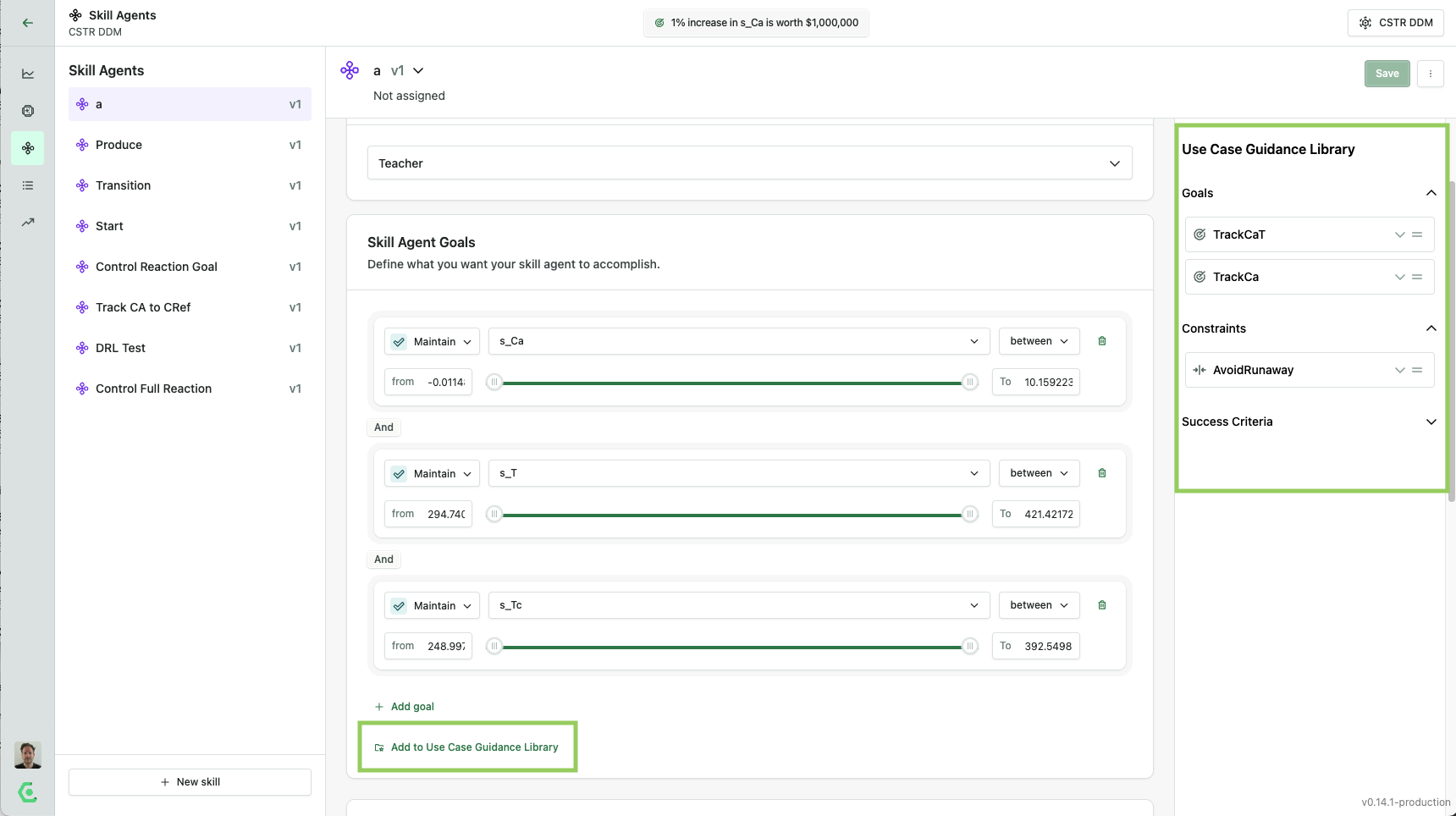
3. Configure the agent
Use the dropdown menus to select the variables and then define the parameters for each goal, constraint, or success criterion you want to include.
## Choose Implementation Method
To create a new skill agent that learns with deep reinforcement learning, select `Teacher` under the `Implementation Method` dropdown. The other option, `Controller`, is used for a programmed agent that is configured with the AMESA Agent Training Library and published to the Agent Orchestration Studio.
## Configure Goals
Goals define what a skill agent should do. Goals apply to one of the sensor variables and are defined using one of three possible directives:
* **Maximize**: Maximize the value of the variable
* **Minimize**: Minimize the value of the variable
* **Maintain**: Keep the variable at a specified value or track a specified variable (such as a set point)
For example, for [the industrial mixer](/reference/sample-use-cases.md#industrial-mixer), we want to maximize the yield of the product over the course of an entire episode, `eps_yield`.
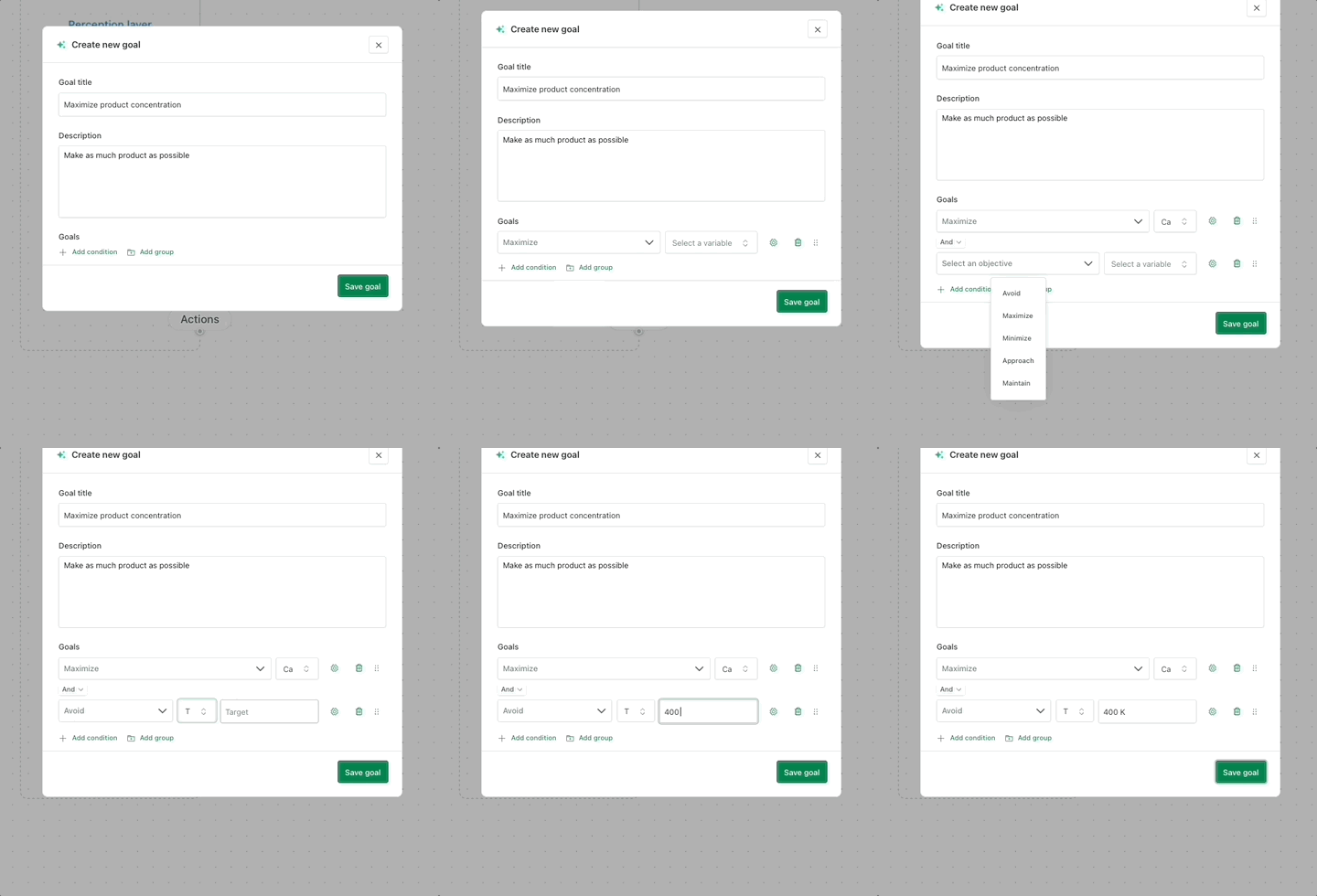
To create a new goal, follow these steps:
1. Navigate to the use case page
2. Click Set up goal and enter a name and description for your goal.
3. Click Add condition to define the goal.
Use the dropdown menus to select the variables and then define the parameters for each goal, constraint, or success criterion you want to include.
## Configure Constraints
Constraints set the boundaries for the skill agent. They define rules that the skill agent must follow during operation. Constraints are defined using one of two possible directives:
* **Avoid**: The skill agent learns to keep the variable from reaching a specified value or range through withholding rewards
* **Terminate**: When the actions of the skill agent lead to certain conditions within a variable, the skill agent has failed and must stop and start a new episode
For example, we want to avoid the temperature, T, getting above 400 degrees Kelvin in [the industrial mixer](/reference/sample-use-cases.md#industrial-mixer) use case.
## Configure Success Criteria
Success criteria tell the skill agent when it's doing something right. They are defined using one of two possible directives:
* **Approach**: The skill agent learns to get close to a specified value by getting increased reward
* **Succeed**: When the success criteria are achieved, the session ends, and a new one begins so that the skill agent can keep practicing and learn to win every time
## Leverage the Guidance Library for Reusability
AMESA supports a Use Case Guidance Library—a reusable set of:
* Goals
* Constraints
* Success Criteria
This feature allows you to save commonly used elements and apply them across multiple agents. Instead of recreating the same definitions every time, you can quickly load goals, constraints, and success criteria from your shared library.
Use this to:
* Maintain consistency across agents
* Speed up setup for similar workflows
* Capture expert-defined logic once and reuse it across Skill agents
## Use Goals, Constraints, and Success Criteria for Multi-Agent AI System Design
Goals, constraints, and success criteria transform complex AI agent building into an intuitive process that eliminates the need for programming expertise.
You directly apply your domain knowledge without coding by simply defining what you want the agent to achieve and what conditions to respect. This approach reduces development time while ensuring AI agents embody real-world operational wisdom, bridging the gap between technical AI capabilities and practical industrial knowledge in complex physical environments.
---
# Agent Instructions
This documentation is published with GitBook. GitBook is the documentation platform designed so that both humans and AI agents can read, navigate, and reason over technical content effectively. Learn more at gitbook.com.
## Querying This Documentation
If you need additional information that is not directly available in this page, you can query the documentation dynamically by asking a question.
Perform an HTTP GET request on the current page URL with the `ask` query parameter, and the optional `goal` query parameter:
```
GET https://docs.amesa.com/build-multi-agent-systems/define-skills/train-with-goals-using-the-ui.md?ask=&goal=
```
`ask` is the immediate question: it should be specific, self-contained, and written in natural language.
`goal` is optional and describes the broader end goal you are ultimately trying to accomplish on behalf of the user. GitBook uses it to tailor the answer towards what is most useful for that goal.
The response will contain a direct answer to the question and relevant excerpts and sources from the documentation.
Use this mechanism when the answer is not explicitly present in the current page, you need clarification or additional context, or you want to retrieve related documentation sections.