> For the complete documentation index, see [llms.txt](https://docs.amesa.com/llms.txt). Markdown versions of documentation pages are available by appending `.md` to page URLs; this page is available as [Markdown](https://docs.amesa.com/build-multi-agent-systems/define-skills/train-with-goals-or-rewards-using-the-sdk.md).
# Create Agents with Rewards Using Python
The AMESA Agent Training Library offers a suite of advanced tools to train agents using deep reinforcement learning. Using the Python teacher class, you can fine-tune the rewards for your agents. Once you have configured an agent with code, you can publish it to the Agent Orchestration Studio to use in agent orchestrations.
## Create a New Agent
To create an agent in Python, begin by logging in to the Agent Training Library by typing `AMESA login` from the CLI.
Then type `amesa agent new`.
Give the agent a name and a description in response to the prompts that follow. Choose whether your skill should be a teacher (learned with AI) or a controller (a programmed module like an optimization algorithm or MPC controller).
Specify the folder where you’d like to create the agent.
The AMESA Agent Training Library will create a folder and Python teacher file from the template.
## The Python Teacher Class
The Python teacher class offers several functions that you can use to fine-tune the training of your skills.
### Functions for Training
#### Train with Rewards: the `compute_reward` Function
The `compute_reward` function provides the bulk of the feedback after each action about how much that action contributed to the success of the agemt. This function returns a number that represents the reward signal the orchestration will receive for its last decision. Reward functions, as they are called in reinforcement learning, can be tricky to craft. [Learn more about how to write good reward functions](https://medium.com/@BonsaiAI/deep-reinforcement-learning-models-tips-tricks-for-writing-reward-functions-a84fe525e8e0).
```python
python
def compute_reward(self, transformed_sensors, action, sim_reward):
self.counter += 1
if self.past_ sensors is None:
self.past_ sensors = transformed_ sensors
return 0
else:
if self.past_ sensors ["state1"] < transformed_ sensors ["state1"]:
return 1
else:
return -1
```
#### End Training: the `compute_termination` Function[](https://autonomy.university/building-agents/adding-skills/teaching-skills.html#compute-termination-function)
The `compute_termination` function tells the AMESA platform when to terminate a practice episode and start over with a new practice scenario (episode). From a teaching perspective, it makes most senses to terminate an episode when the agent system succeeds, fails, or is pursuing a course of action that you do not find likely to succeed. This function returns a Boolean flag (`True` or `False`) whether to terminate the episode. You can calculate this criteria however seems best.
```python
python
def compute_termination(self, transformed_ sensors, action):
return False
```
#### Define Success: the `compute_success_criteria` Function[](https://autonomy.university/building-agents/adding-skills/teaching-skills.html#compute-success-criteria-function)
The `success_criteria` function provides a definition of agent success and a proxy for how completely the agent system has learned the skill. The platform uses the output of this function (`True` or `False`) to calculate when to stop training one agent and move on to training the next agent. It is also used to determine when to move to the next agent in a fixed order sequence. The agent system cannot move from one agent in a fixed order sequence to the next, until the success criteria for one agent is reached.
```python
python
def compute_success_criteria(self, transformed_ sensors, action):
return self.counter > 100
```
Here are some examples of success criteria definition:
* A simple but naive success criteria might return `True` if the average reward for an episode or scenario crosses a threshold, but `False` if it does not.
* A more complex success criteria might calculate root mean squared error (RMSE) for key variables across the episode and return `True` if the error is less than a customer specified benchmark, but `False` otherwise.
* A complex success criteria might compare a benchmark controller or another agent system to the agent system across many key variables and trials. It returns `True` if the agent system beats the benchmark on this criteria, but `False` otherwise.
#### Train with Goals
Training with goals lets you use a predefined reward structure rather than configuring the rewards individually. When you use a goal, your agent will inherit the compute reward, compute termination, and compute success functions from the goal. (You will still have the option to further customize those functions as needed.)
The five goal types you can use are:
* `AvoidGoal`
* `MaximizeGoal`
* `MinimizeGoal`
* `ApproachGoal`
* `MaintainGoal`
These have the same parameters and work the same way as [the goal types in the UI](https://app.gitbook.com/o/TnHRmXbRhAMO4m95Ca9E/s/6X1hFdU8qyyv3sgW7kkX/~/changes/5/build-autonomous-agents/define-skills/set-goals-in-the-ui).
Goals are added using specialized teacher classes rather than the general teacher class that you would otherwise use to teach agents. For example, for an agent named Balance that you wanted to train with a goal to maintain a specific orientation, you would use the MaintainGoal teacher class.
```python
python
class BalanceTeacher(MaintainGoal):
def __init__(self, *args, **kwargs):
super(),__init__(“pole_theta”, “Maintain pole to upright”, target=0, stop_distance=0.418)
```
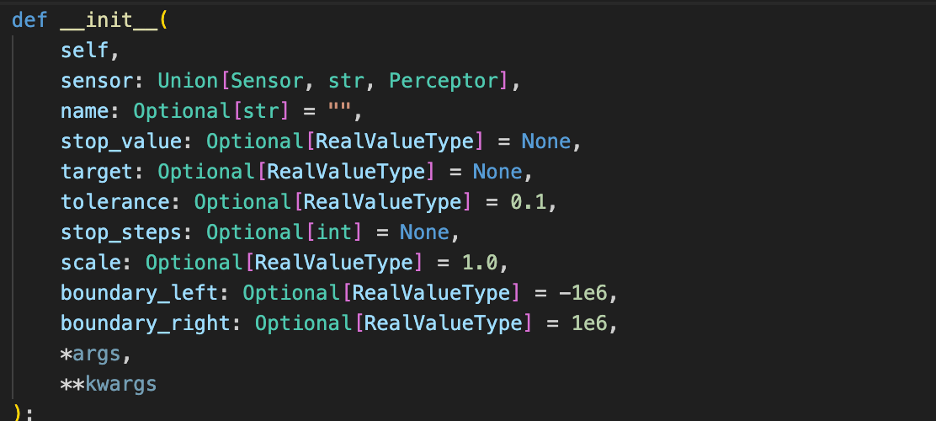
The parameters you can use for goals are:
You can also use more than one goal for a single skill using the `CoordinatedGoal` teacher class. This is useful when your agent system needs to behave in a way that creates a balance between two goals that are both important.
### Functions to Guide Agent System Behavior with Rules
Just like rules guide training and behavior for humans, providing rules for the agent system to follow can guide its decision-making more quickly to success. Rules guide the behavior of an agent system based on expertise and constraints.
#### Add Rules: the `compute_action_mask` Function
The `compute_action_mask` teaching function expresses rules that trainable agents must follow.
```python
python
# The action mask provides rules at each step about which actions the agent system is allowed to take.
def compute_action_mask(self, transformed_ sensors, action):
return [0, 1, 1]
```
The `compute_action_mask` teaching function works only for discrete action spaces (where the actions are integers or categories), not for continuous action spaces (where decision actions are decimal numbers). If you specify a mask for a skill whose actions are continuous, the platform will ignore the action mask.
The function returns a list of 0 and 1 values. Zero means that the action is forbidden by the rule. One means that the action is allowed by the rule. The function may change the returned value after each decision. This allows complex logic to express nuanced rules.
In the example above, the first action is forbidden for the next decision, but the second and third actions are allowed. The logic in the agent itself (whether learned or programmed) will choose between the allowed second and third actions.
All orchestrators have a discrete action space (they choose which child skill to activate), so you can always apply the `compute_action_mask` function to teach them.
### **Functions to Manage Information Inside Agent S**ystem**s**
As information passes through perceptors, agents, and orchestrators in the agent system, sometimes it needs to change format along the way. You can use three teaching functions to transform sensor and action variables inside agent systems: `transform_` sensors, `transform_action`, and `filtered_` sensor `_space`.
#### Transform Sensor Variables: the `transform_sensors` function[](https://autonomy.university/building-agents/adding-skills/teaching-skills.html#transforming-sensor-variables)
To transform sensor variables, use the `transform_sensor` function to calculate changes to specific sensors, then return the complete set of sensor variables (the observation space).
```python
python
def transform_sensor(self, sensor, action):
return sensor
```
Two of the most common reasons for transforming sensor variables are conversion and normalization. For example, if a simulator reports temperature values in Fahrenheit, but the agent system expects temperature values in Celsius, use the `transform_sensor` function to convert between the two.
Normalization is when you transform variables into different ranges. For example, one sensor variable in your agent system might have very large values (in the thousands), but another variable might have small values (in the tenths), so you might use the `transform_sensor` function to transform these disparate sensor values to a range from 0 to 1 so that they can be better compared and used in the agent system.
#### Transform Decisions within the Agent System[](https://autonomy.university/building-agents/adding-skills/teaching-skills.html#transforming-decisions-within-the-agent): the `transform_action` function[](https://autonomy.university/building-agents/adding-skills/teaching-skills.html#transforming-sensor-variables)
You may want to transform action variables for the same reasons as sensor variables.
```python
python
def transform_action(self, transformed_sensor, action):
return action
```
#### Filter the Sensor List: the `filtered_sensor_space` function[](https://autonomy.university/building-agents/adding-skills/teaching-skills.html#transforming-sensor-variables)
Use the `filtered_sensor_space` function to pare down the list of sensor variables you need for a particular skill. Pass only the information that a skill or module needs in order to learn or perform well.
```python
python
def filtered_sensor_space(self):
return ["state1"]
Return a list of all the sensor variables that you want passed to the skill by this teacher.
```
---
# Agent Instructions
This documentation is published with GitBook. GitBook is the documentation platform designed so that both humans and AI agents can read, navigate, and reason over technical content effectively. Learn more at gitbook.com.
## Querying This Documentation
If you need additional information that is not directly available in this page, you can query the documentation dynamically by asking a question.
Perform an HTTP GET request on the current page URL with the `ask` query parameter, and the optional `goal` query parameter:
```
GET https://docs.amesa.com/build-multi-agent-systems/define-skills/train-with-goals-or-rewards-using-the-sdk.md?ask=&goal=
```
`ask` is the immediate question: it should be specific, self-contained, and written in natural language.
`goal` is optional and describes the broader end goal you are ultimately trying to accomplish on behalf of the user. GitBook uses it to tailor the answer towards what is most useful for that goal.
The response will contain a direct answer to the question and relevant excerpts and sources from the documentation.
Use this mechanism when the answer is not explicitly present in the current page, you need clarification or additional context, or you want to retrieve related documentation sections.