> For the complete documentation index, see [llms.txt](https://docs.amesa.com/llms.txt). Markdown versions of documentation pages are available by appending `.md` to page URLs; this page is available as [Markdown](https://docs.amesa.com/build-multi-agent-systems/configure-scenarios.md).
# Configure Scenarios
Scenarios[^1] are situations where your agent system needs to behave differently to succeed. Scenarios correspond to [activity clusters](/identify-agent-skills/generate-activity-clusters.md) - activity clusters identify different operating regions within a dataset and scenarios allow agents to train and specialize in these different regions.
Scenarios are created by carving out sections of the simulation space, as defined by specific configurations of variables and variable ranges. This allows you to train agents only in the scenarios where they will need to perform, leading to more efficient training and better performance. Orchestrators learn to recognize scenarios and pass control to the appropriate specialist agent to handle the scenario’s demands.
## Types of Scenarios
How you define scenarios depends on the type of sensor variables you are working with.
Discrete variables are categories that describe a particular scenario. For each scenario involving discrete variables, there is likely a perceptor in the agent system, such as a machine learning model, that inputs the sensors, processes the sensor values, and outputs the discrete variable category.
Continuous variables are numbers. When they are used to define a scenario, one number value determines the section of the space that your agent system will explore for decisions.
Sometimes a scenario is better defined by a range of continuous values than by a single continuous value. In that case, the scenario would be defined by a continuous variable range.
Here are some examples of how scenarios can be defined in different ways:
| Use Case | Discrete Variables | Continuous Variables | Continuous Variable Ranges |
| ---------------------------------- | --------------------------------------- | ----------------------------------- | --------------------------------------------------- |
| Drone Control | windy, far\_from\_charger, low\_battery | windspeed=20 (knots) | windspeed between 20-40 (knots) |
| Autonomous Driving | city, highway, high\_traffic | vehicle\_speed=65 (miles per hour) | vehicle\_speed between 65-85 (miles per hour) |
| Cybersecurity Network Optimization | normal, high\_traffic, cyberattack | site\_traffic=0 (clicks per second) | site\_traffic between 100-150 (clicks per second) |
| Process Control | startup, steady\_state, shutdown | product\_thickness=50 (milimeters) | product\_thickness between 49.94-50.06 (milimeters) |
| Machine Control | break-in, normal, wearing\_out | rpm=280 (revolutions per minute) | rpm between 250-295 (revolutions per minute) |
## Scenarios Example
Let’s say that we are creating a team of agents to plan the operations of a restaurant with varying demand for three different recipes. We could create three different scenarios:
* Low demand: 30 recipe A, 20 recipe B, and 10 recipe C
* Normal demand: 60 recipe A, 45 recipe B, and 10 recipe C
* High demand: 100 recipe A, 50 recipe B, and 25 recipe C
Once you have defined these scenarios, you could set the agent system to train in the low-demand scenario until the success criteria are reached. Then it would move to normal demand, and then to high demand. We would expect the agent to learn faster as it progressed through the scenarios, with cumulative knowledge building over time.
## Set Up Scenarios
### Add Scenarios to a Use Case
Add scenarios to your use case by clicking on Scenarios from the left-hand menu to open the Scenarios page.
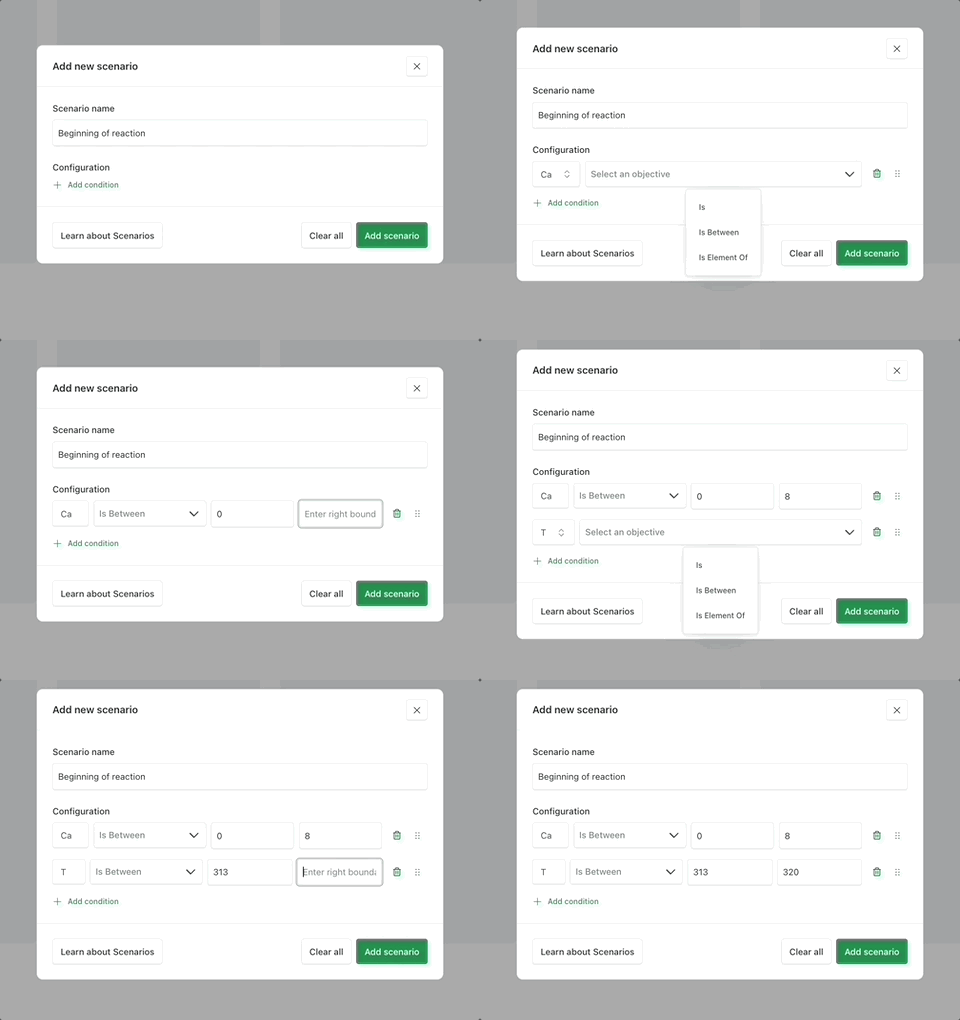
Click Add scenario to create a new scenario. Give your scenario a name and then click `Add another criteria` to configure it. You will then have the option to choose from any of the available sensor variables and apply conditions to them.
* For continuous variables, select Is and enter the exact value.
* For continuous variable ranges, select Is between and enter the range.
* For discrete variables, select Is element of and enter the possible values.
### Create Scenario Flows
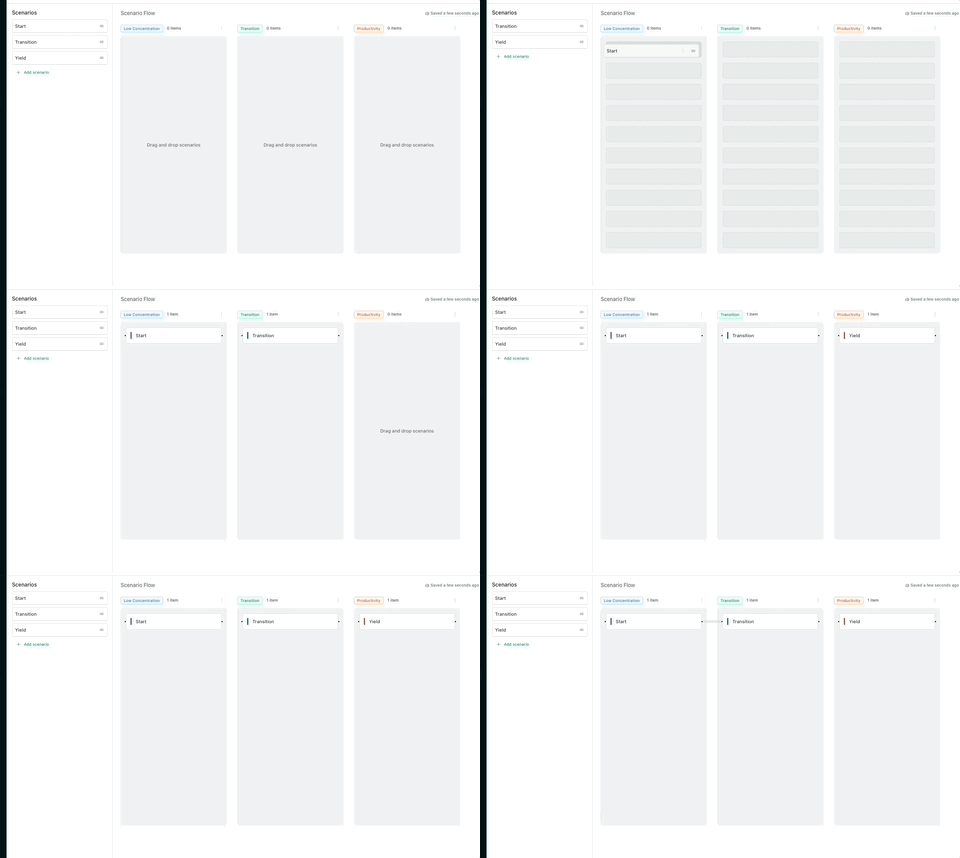
In addition to identifying scenarios, AMESA also lets you teach your team of agents about how scenarios relate to each other. To do this, you can build scenario flows to establish sequences of scenarios for the agent system to practice.
Without scenario flows, the training platform will connect scenarios at random. But sometimes it is important for agent systems to practice scenarios in a specific order. For example, it might be important to practice flying a drone in high winds and then landing in the same conditions. Or a team of agents managing a production line might need to practice going from a scenario in which raw materials are scarce to one in which material costs rapidly rise. By creating a scenario flow, you can ensure that a given sequence of scenarios will be included in training.
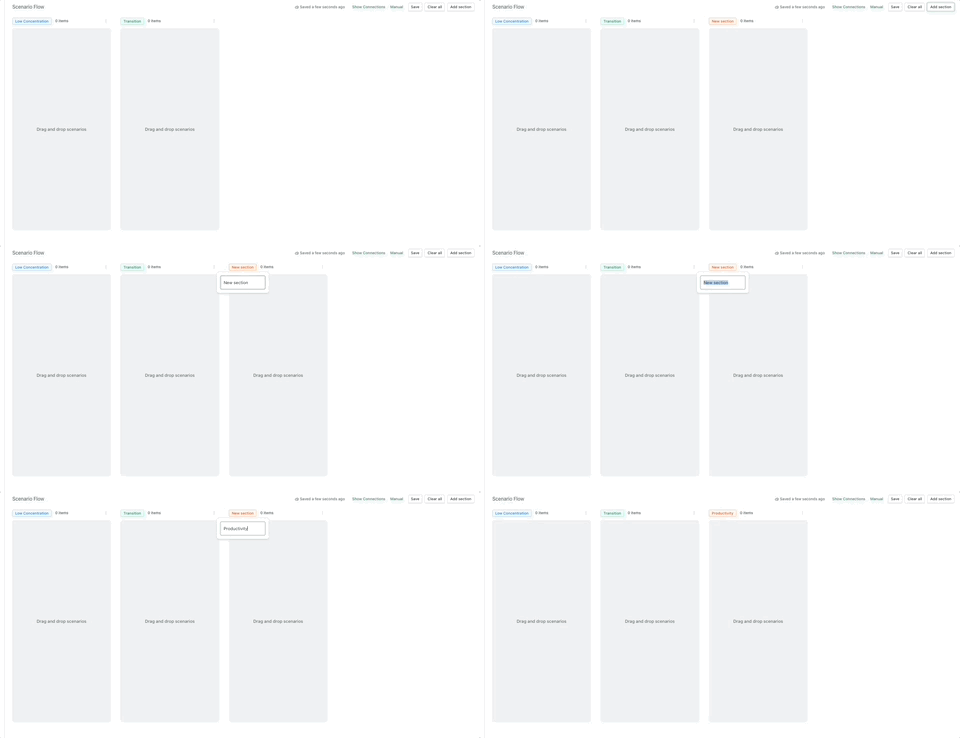
Once you have scenarios built, create sequential sections of the task by clicking Add section.
After creating all the sections you need, drag and drop the scenarios into the sections.
Create as many flows as you need to capture the different scenario sequences your agent system will need to navigate.
### Add Scenarios to Agents
Scenarios are added as part of configuring agents. Scenarios are added to agents so that they know what specific conditions they need to master. Not all scenarios are relevant to all agents. For example, a drone landing agent doesn’t need to practice taking off in windy weather.
The configurations you set up when building the scenario flows will appear in the skill agent configuration modal. For each section of the process, as defined by the flows, tell the orchestrator which scenarios it should apply by checking the boxes next to each scenario.
[^1]: Conditions that are associated with specific skills
---
# Agent Instructions
This documentation is published with GitBook. GitBook is the documentation platform designed so that both humans and AI agents can read, navigate, and reason over technical content effectively. Learn more at gitbook.com.
## Querying This Documentation
If you need additional information that is not directly available in this page, you can query the documentation dynamically by asking a question.
Perform an HTTP GET request on the current page URL with the `ask` query parameter, and the optional `goal` query parameter:
```
GET https://docs.amesa.com/build-multi-agent-systems/configure-scenarios.md?ask=&goal=
```
`ask` is the immediate question: it should be specific, self-contained, and written in natural language.
`goal` is optional and describes the broader end goal you are ultimately trying to accomplish on behalf of the user. GitBook uses it to tailor the answer towards what is most useful for that goal.
The response will contain a direct answer to the question and relevant excerpts and sources from the documentation.
Use this mechanism when the answer is not explicitly present in the current page, you need clarification or additional context, or you want to retrieve related documentation sections.