> For the complete documentation index, see [llms.txt](https://docs.amesa.com/llms.txt). Markdown versions of documentation pages are available by appending `.md` to page URLs; this page is available as [Markdown](https://docs.amesa.com/build-multi-agent-systems/add-a-perception-layer.md).
# Add a Perception Layer
Adding perception modules to your agent can provide richer, complex, condensed, and nuanced information to the decision-making parts of the agent system. For example, you might include a computer vision model in your perception layer that inputs images or video from a camera and outputs classifications of objects that it identifies. You can also add large language models as perceptors to take in and interpret information in natural language.
Each module in the perception layer for a AMESA agent system inputs the sensor variables, processes those variables in some way, and outputs one or more *new variables* that the platform will automatically add to the list of sensors.
Perceptors can use any supported Python function or library to calculate outputs. They can even call machine learning and large language models or their APIs.
The next three pages explain how to use the SDK and CLI workflow to create new perceptors or configure existing models as perceptors to use in AMESA agent systems.
## Add Perceptors to Agent Systems
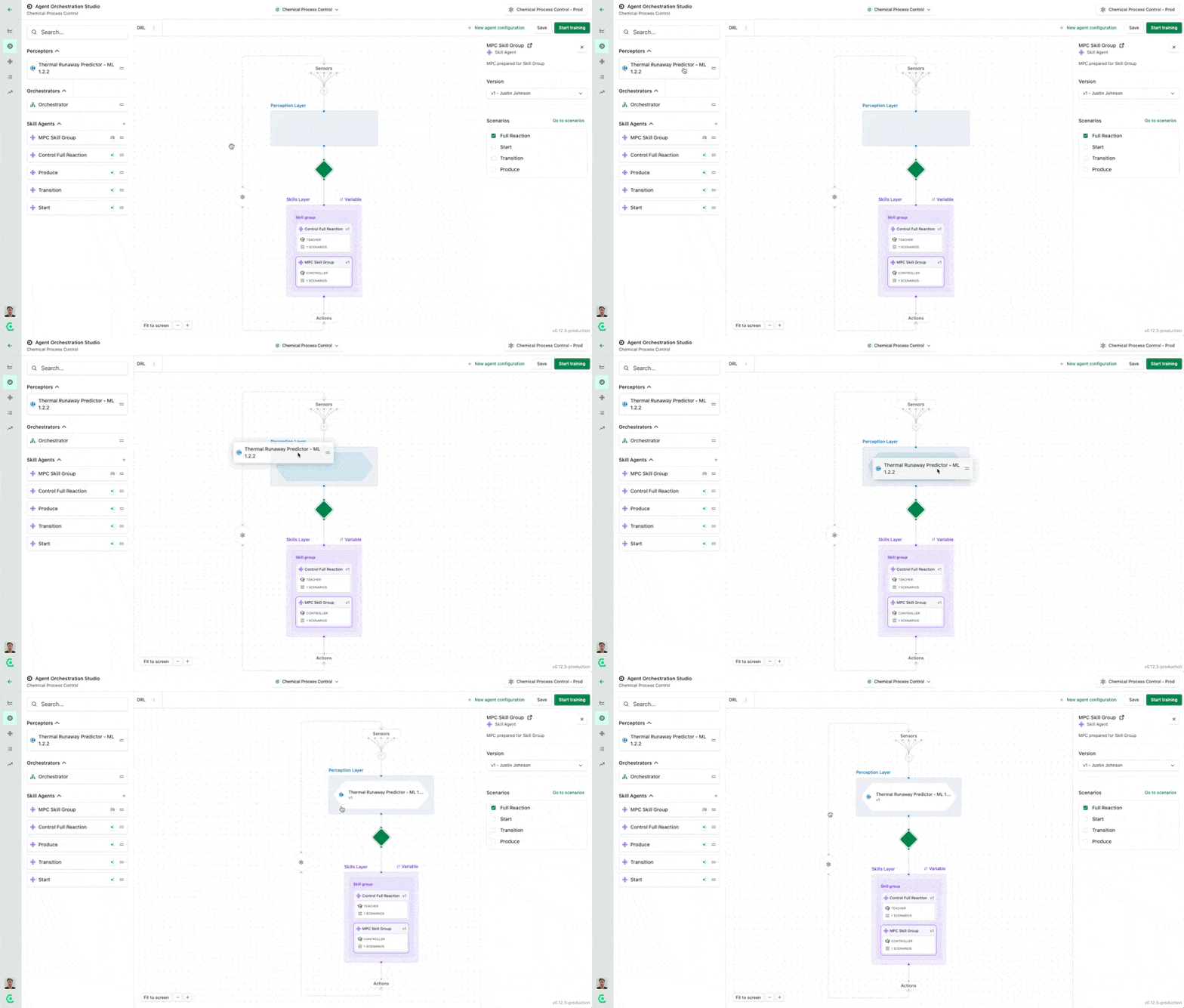
Just like skill agents, perceptors can be dragged and dropped into agent systems using the UI. Perceptors will always be situated in the Perception layer that comes before orchestrators and skill agents. That’s because perception needs to be applied to the sensor inputs to create new variables that are then passed to the skills layer for the agent system to use in decision-making.
---
# Agent Instructions
This documentation is published with GitBook. GitBook is the documentation platform designed so that both humans and AI agents can read, navigate, and reason over technical content effectively. Learn more at gitbook.com.
## Querying This Documentation
If you need additional information that is not directly available in this page, you can query the documentation dynamically by asking a question.
Perform an HTTP GET request on the current page URL with the `ask` query parameter, and the optional `goal` query parameter:
```
GET https://docs.amesa.com/build-multi-agent-systems/add-a-perception-layer.md?ask=&goal=
```
`ask` is the immediate question: it should be specific, self-contained, and written in natural language.
`goal` is optional and describes the broader end goal you are ultimately trying to accomplish on behalf of the user. GitBook uses it to tailor the answer towards what is most useful for that goal.
The response will contain a direct answer to the question and relevant excerpts and sources from the documentation.
Use this mechanism when the answer is not explicitly present in the current page, you need clarification or additional context, or you want to retrieve related documentation sections.